
You can now manually add your podcasts via RSS on YouTube Music،
We’ve known about Google’s plans to make YouTube your one-stop destination for entertainment for a while now. The combination of YouTube and YouTube Music now encompasses all your media streaming needs, from videos, movies, music, and now podcasts.
The addition of podcasts to the YouTube Music app in a bid to replace the legacy Google Podcasts app was made public by the company in September, with evidence of support for private RSS feeds dating back to a month before. ‘announcement. In doing so, YouTube Music would allow podcasters to effortlessly publish their podcasts directly, eliminating the need for middlemen, while streamlining the process by which listeners can subscribe.
Now as spotted 9to5Google, Google followed through and is currently rolling out this feature to the Android and web versions of the YouTube Music app. Unfortunately, it doesn’t appear that the feature has rolled out to its iOS counterpart yet, although podcasts already added via other platforms will still be accessible on iOS.
Adding a podcast to the YouTube Music Android app via RSS feed
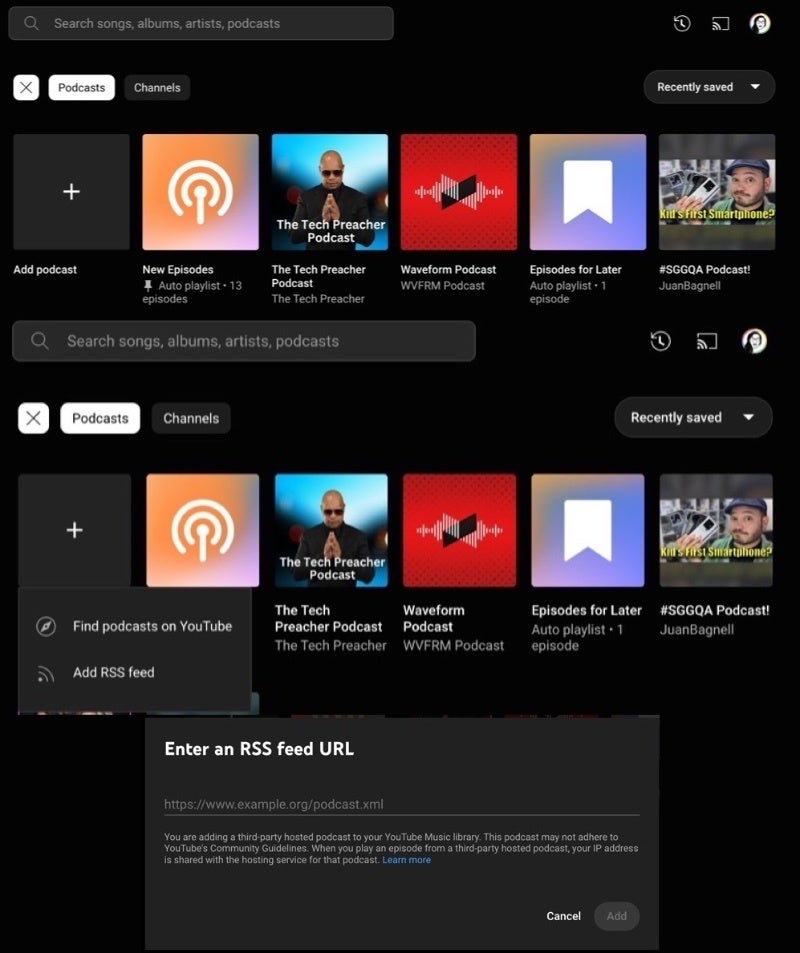
Adding a podcast to YouTube Music on the web via RSS feed
On the Android application, the possibility of adding a podcast via RSS feed is found in the Library tab by tapping on the “Podcasts” category. You will then see an option at the bottom left to “Add Podcast” which, when tapped, will give you the option to browse the top podcasts or add a private or public .xml URL for the desired podcast feed. The process is pretty much the same on the web as well, accessible by going to music.youtube.com/library/podcasts.
Google is clearly committed to making YouTube Music the ultimate destination for podcasts by investing in resources to create a more robust podcasting experience. Providing migration tools, such as the ability to import podcast RSS feeds, will be a very important step towards achieving this goal.