New, useful feature for the Google Photos app is rolling out now،
Android and iOS users of the Google Photos app are getting a new feature called Photo Stacks. According to
a tweet from Artem Russakovsky (via
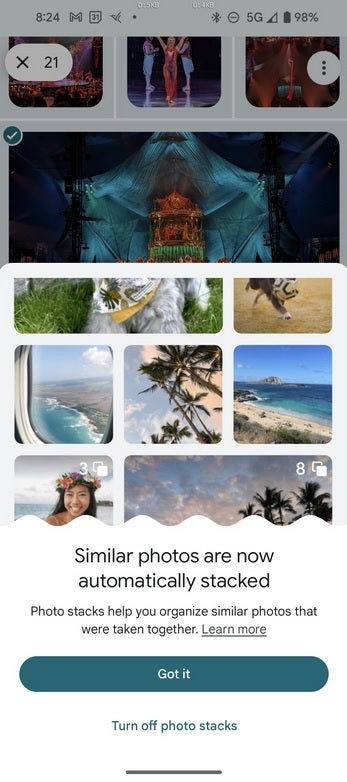
Forbes), you will know when Photo Stacks has been added to your phone. Indeed, you will receive a pop-up message explaining that Photo Stacks has been automatically activated on your handset. You can disable the feature directly from the pop-up window or go to the
app settings to disable the feature; we'll explain how to do this later in this article.
Photo stacks are collections of photos taken around the same time and stacked under a single thumbnail image. The only photo visible in the stack is the one on top which is the thumbnail of the entire stack. This photo is called the “first choice”. With Photo Stacks, you can avoid the typical scenario of scrolling through images and seeing similar photos one after one. This is the kind of thing that happens if you take multiple photos in search of the perfect selfie or group photo.
You will receive this notification when Photo Stack is added to your phone
Since you only see the “top choice” of a stack, users may have a harder time seeing a particular version of a photograph they want to view. To do this, with photo stacks enabled, the user will need to tap on the stack and cycle through each photo in the stack. One way to make this a little easier is to search for a stack with a photo on it that is similar to the one you are looking for. Tap the stack to open it and go through each photo.
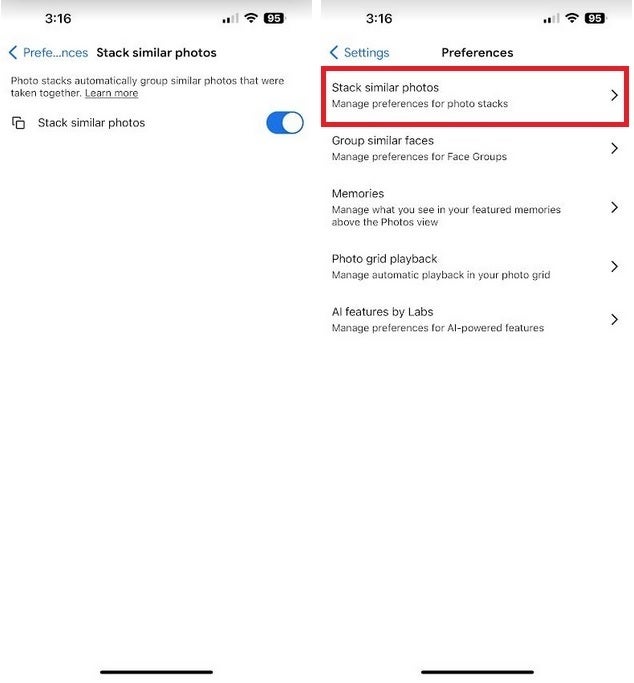
You can disable Photo Stack in the Google Photo app settings
If enabling Photo Stack becomes too much of a hassle, you can turn the feature off by opening the Google Photos app and tapping the profile icon in the upper right corner of the screen. Tap Google Photos Settings, then Preferences. If you have this feature, you will see a list that says “Stack Similar Photos.” It should be enabled by default and you can disable it by tapping the “Stack Similar Photos” toggle.